Psytrance Key Finder | Discover Camelot Keys, BPM & Harmonic Mix Compatibility
Search by song, artist, album, or Camelot key.
Every track is analyzed with Mixed In Key
| Key | Artist | Song | Album | BPM | Year | Length |
|---|
Fun facts & stats
How many tracks contain...
Type a word to search track titles.
Artists tend to write in...
Type an artist name to look up their most common key.
Most psychedelic words
The most common words in psytrance track titles, genre noise like "remix" or "edit" filtered out.
About these stats
How does "How many tracks contain..." work?
Type any word and it searches every track title in the database. It shows how many tracks matched and which keys are most common among them.
How does the artist key lookup work?
Type an artist's name and it shows their most common key across their tracks in the database. Artists with fewer than 3 tracks are left out since the pattern would not be meaningful yet.
Why might some collaboration tracks be missing from an artist's results?
A collaboration credited under a combined name, like "Artist A & Artist B", counts as a separate artist entry. Only the exact artist name you search for is included, and only if it has at least 3 tracks.
How is "Most psychedelic words" calculated?
It counts how often each word appears across all track titles, then filters out common English words and genre noise like "remix" or "edit" so genuinely common themes surface instead.
Are duplicate tracks counted more than once?
No. If the same track appears on multiple albums or compilations, all three tools above only count it once, so re-releases do not skew the numbers.
About this site
This is a gift to the psytrance community and other like-minded people. I wanted DJs to have a fast way to look up the Camelot key of any psytrance track, so I built a searchable database from my own collection.
From there it grew into more than just a lookup tool. You can search by artist, song, album, or key, browse harmonically compatible tracks for any track using the Camelot Wheel, build a playlist as you go and copy it out when you are done, and dig into the Stats tab to see patterns across the whole database, like which keys are most common, which words show up most in track titles, or what key a given artist tends to write in.
Every psytrance track has been analyzed using Mixed In Key and follows the Camelot Wheel system. I use Mixed In Key because, in my experience, it provides highly reliable key detection. While other tools such as Rekordbox and platforms like Beatport can occasionally assign different keys, Mixed In Key has consistently delivered accurate results for my collection.
Having collected music since childhood, some release names may contain inaccuracies. Over the years, many unofficial and mislabeled releases have circulated online, and improving these entries is an ongoing process.
Nothing you build here, like a playlist, leaves your browser unless you choose to copy or paste it somewhere yourself. There is no account, no sign-up, and no tracking of what you search for.
More from me
You can find more of my projects, music-related tools, and creative work at daddasounds.com.
Harmonic mixing reference (Camelot Wheel)
Want the full guide, my key-distribution stats and FAQ? Read the complete guide →
Harmonic Mixing Cheat Sheet
A quick reference guide for mixing with the Camelot Wheel.
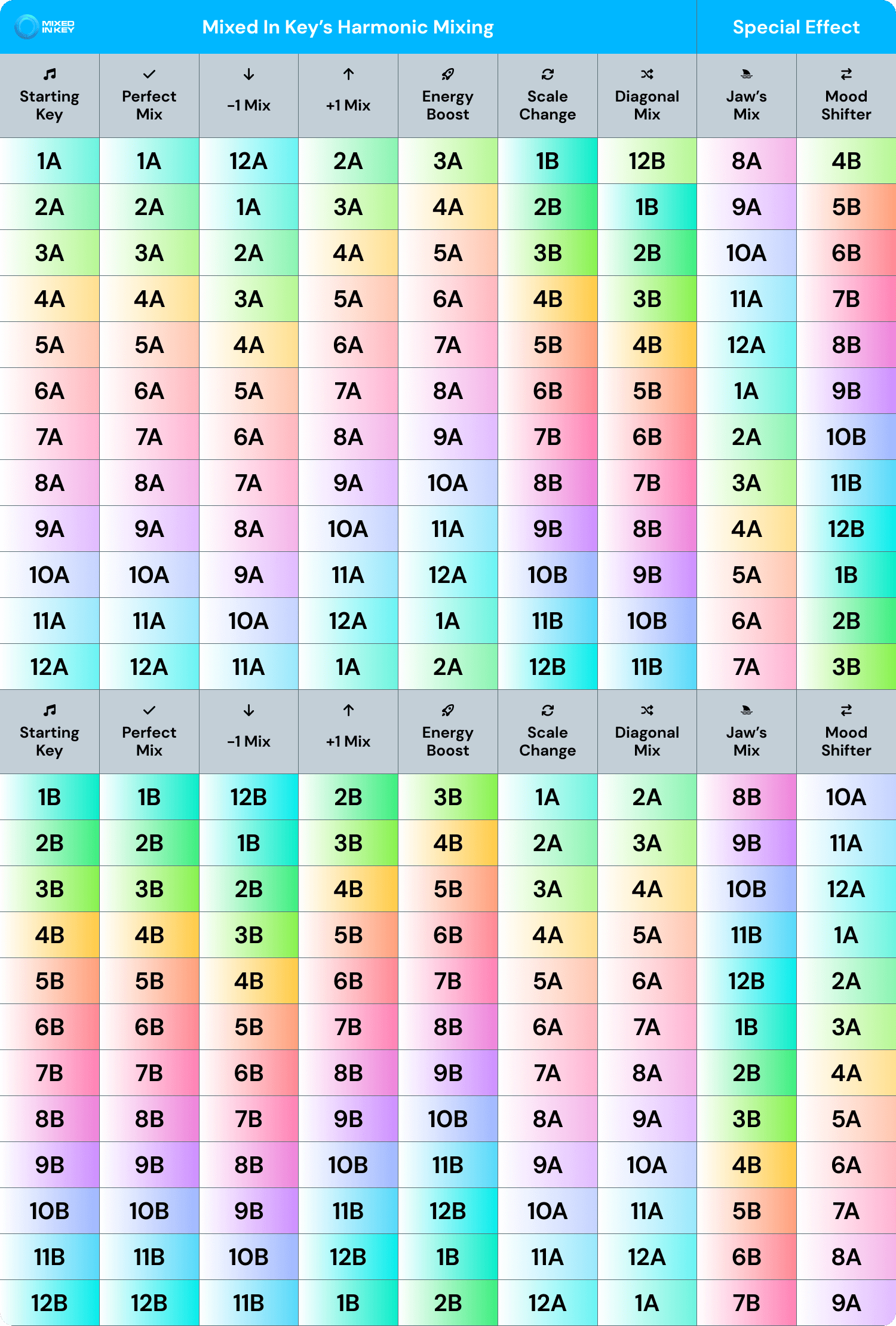 Read more about harmonic mixing →
Camelot ↔ Circle of fifths
Translation between traditional musical keys and the Camelot notation Mixed In Key uses.
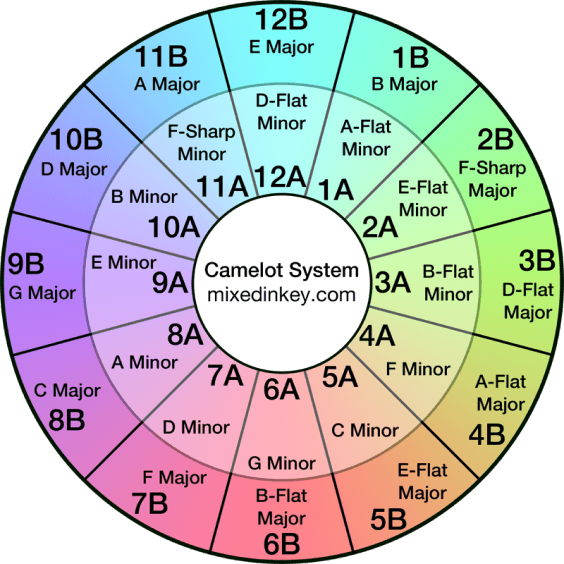 Read more about the Camelot Wheel →
Your playlist
Build a set from the search results, reorder it, then copy it to paste wherever you like. Nothing here is saved on my server, it stays in your own browser.
How the playlist builder works
How do I add a track to my playlist?
Click the plus button next to any track in the search results. The track gets added to your playlist and you can see it under the Playlist tab.
Can I change the order of the tracks?
Yes. Open the Playlist tab and use the up and down arrows next to each track to move it earlier or later in the list.
Where is my playlist stored?
Your playlist is stored only in your own browser using your browser's local storage. It is never uploaded to my servers or shared with anyone.
Can I access my playlist from another device?
No. Because playlists are stored only in your current browser, they do not sync between devices, browsers, or browser profiles.
Can my playlist be lost?
Yes. Your playlist can be lost if you clear your browser data, use private/incognito browsing, reset or reinstall your browser, switch to another browser or device, or if your browser removes stored website data. I cannot recover lost playlists because no copy is stored on my servers.
How can I avoid losing my playlist?
Copy it to your clipboard and paste it somewhere permanent, like a notes app, a document, or an email draft, since your browser is the only place it lives otherwise.
How do I copy my playlist?
Click Copy to clipboard. The list gets copied as text, numbered in order, ready to paste anywhere you like.
Is there a limit to how many tracks I can add?
Yes, up to 300 tracks per playlist, more than enough for a full set.